Blend Modes Part 4: Contrast | Photoshop Tutorials 101
Blend Modes Part 4 | Photoshop Tutorials 101 Overview This week’s photoshop tutorial is all about utilizing the contrasting blend modes to get the boost in contrast that these modes give to an image. These modes can both brighten and darken certain parts of an image in order to get the effect. Overlay The ‘Overlay’ blend mode does not replace the base colors but instead mixes the blend color while reflecting the highlights and shadows of the image. Soft Light The ‘Soft Light’ blend mode [...]

What is the JPEG Artifact Removal Neural Filter? | Adobe Photoshop
What is JPEG Artifact Removal? | Adobe Photoshop Tutorial With the release of Adobe Photoshop 22.0 in October 2020 Adobe released the JPEG Artifact Removal neural filter. In order to understand what this filter does you first need to understand how JPEGs work. JPEGs use compression algorithms to remove unnecessary details to images in order to reduce the file size. The algorithm does well but does degrade over time based on how many saves away you get from the master file. This degradation shows in the form of artifacting. Artifacting makes images look fuzzy and often [...]
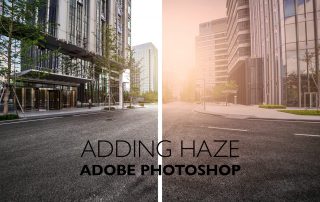
How to Add Haze with a Neural Filter | Adobe Photoshop Tutorial
Depth-Aware Haze Neural Filter | Adobe Photoshop Tutorial With the release of Adobe Photoshop 22.0 in October 2020 Adobe released the Depth-Aware Haze beta neural filter. This new filter is not necessarily as revolutionary as many others in the current lineup but does offer a nice shortcut for designers. Originally designers would have to mask out the foreground, add a layer of haze behind the foreground and adjust accordingly. Now, that is all a memory of the past with this filter in Photoshop. How to Use Depth-Aware Haze Realistic haze with neural [...]

How to Use Makeup Transfer in Adobe Photoshop
Makeup Transfer Neural Filter | Adobe Photoshop Tutorial With the release of Adobe Photoshop 22.0 in October 2020 Adobe released what they’re calling the Makeup Transfer beta neural filter. This filter takes a source portrait and attempts to apply the makeup found within on another portrait. This can be useful in portraiture when a model doesn't show up with the right makeup or when you shoot with minimal makeup but want to add more in post. How to Use Makeup Transfer Makeup Transfer can be completed via the following five steps. [...]

What is Super Zoom in Adobe Photoshop
Super Zoom | Adobe Photoshop Tutorial With the release of Adobe Photoshop 22.0 in October 2020 Adobe released the Super Zoom beta neural filter. Super Zoom allows for the user to punch in on a person at varying magnitudes and then leverages the Sensei AI to enhance the photo to remove degradation. How to Use Super Zoom Super Zoom can be completed via the following seven steps. 1. Open Image Open a Photoshop document and select an image 2. Open Neural Filters Go [...]